 Skip to main content
How To Read A Power Supply Derating Curve And Choose The Right PSU
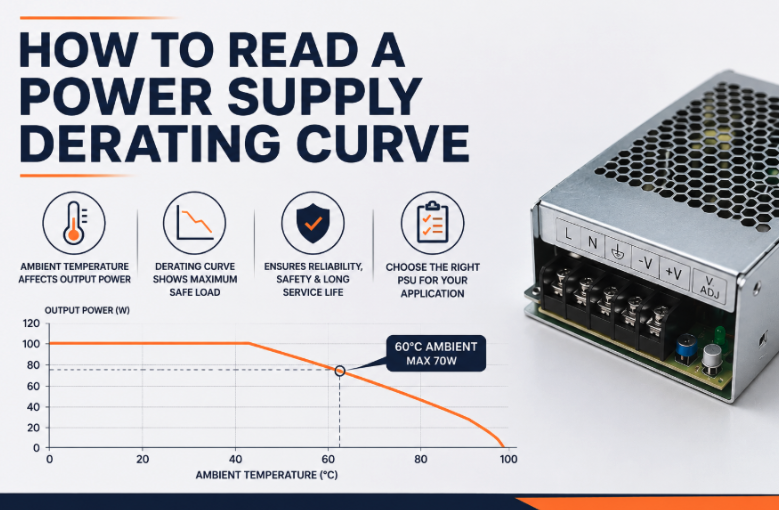
Choosing a power supply based solely on its specified output power can be a mistake. A unit rated at 100W, for example, may not be able to deliver its full 100W under every combination of ambient temperature, input voltage, cooling method, and mounting arrangement.
This is where power supply derating becomes important.
A power derating curve shows how the maximum usable output power or output current changes as operating conditions change. Understanding the curve helps design engineers select a power supply that can safely deliver the required power throughout the intended operating environment – rather than simply choosing a PSU with a nominal power rating that looks sufficient on paper.
In this guide, we’ll explain what power supply derating means, why it’s necessary, how to read a derating curve, and what to consider when selecting a PSU for your application.
What is power supply derating?
Power supply derating means operating a power supply below its maximum rated capacity under particular operating conditions.
A PSU might have a specified output power rating of 100W, but that doesn’t necessarily mean it can deliver 100W at every ambient temperature or input voltage. As conditions become more demanding, you may need to reduce the maximum safe output power.
The most common reason is temperature. Power supplies contain components such as electrolytic capacitors, bridge rectifiers, switching devices, and transformers that generate and dissipate heat during operation. As the ambient temperature rises, these components have less thermal headroom before reaching their maximum operating temperature.
Reducing the load reduces power dissipation within the PSU and helps keep internal components within their thermal limits. This is the principle behind temperature-derating power supply specifications and the power-derating curves found in many data sheets.
Why do power supplies need to be derated?
Virtually all power supplies produce some level of heat during operation. The amount depends on factors including load, efficiency, input voltage, cooling system, and power supply design. A simplified way of looking at it is:
Component temperature = ambient temperature + temperature rise
Temperature rise is influenced by both the power dissipated inside the PSU and the thermal impedance between its internal components and the surrounding environment. As ambient temperature increases, less thermal headroom is available. If the PSU continues operating at maximum load, internal components can exceed their specified temperature limits. Power supply derating helps maintain:
- Safe and reliable operation
- Acceptable component temperatures
- Long-term reliability
- Expected service life
- Protection against thermal shutdown
- Compliance with the manufacturer’s specified operating conditions
It can be particularly important in applications involving high ambient temperatures, enclosed equipment, or control cabinets where cooling efficiency may be limited. For more on power supplies used in control panels and industrial installations, see our guide to DIN rail power supplies.
What is a power supply derating curve?
A power supply derating curve is a graph showing the maximum allowable load under particular operating conditions. The most common type shows output power or output current against ambient temperature. A hypothetical 100W power supply might be rated for:
- 100W up to 40°C ambient temperature
- 80W at 50°C
- 60W at 60°C
- No operation above a specified maximum temperature
The exact figures vary between power supplies, so the manufacturer’s data sheet should always be treated as the definitive source. Some derating curves show output current rather than output power. This is particularly relevant when the PSU has a fixed or maximum output voltage, because Power = Voltage × Current.
So, if a 24V power supply can provide 4A, its maximum output power is 96W. If the derating curve limits the output current to 2.5A at a particular temperature, the maximum output power at that temperature becomes 60W.
How to read a derating curve
Reading a derating curve is straightforward once you understand what each axis represents.
1. Identify the axes
Start by checking the horizontal and vertical axes. A typical thermal derating curve will show:
- X-axis: ambient temperature
- Y-axis: maximum allowable output power, output current or load percentage
The maximum power output curve indicates the maximum load that can safely be applied at each temperature. Don’t assume every manufacturer presents the information in the same way. Some curves may use percentage of rated power, while others show watts or amps directly.
2. Find your actual ambient temperature
Next, establish the expected ambient temperature around the power supply. This isn’t necessarily the same as the temperature outside the overall system.
For a PSU installed inside a closed control cabinet, for example, the air surrounding the power supply may be significantly warmer than the room temperature because other components are also generating heat. Use the expected worst-case operating temperature rather than an average temperature.
3. Read across to the derating curve
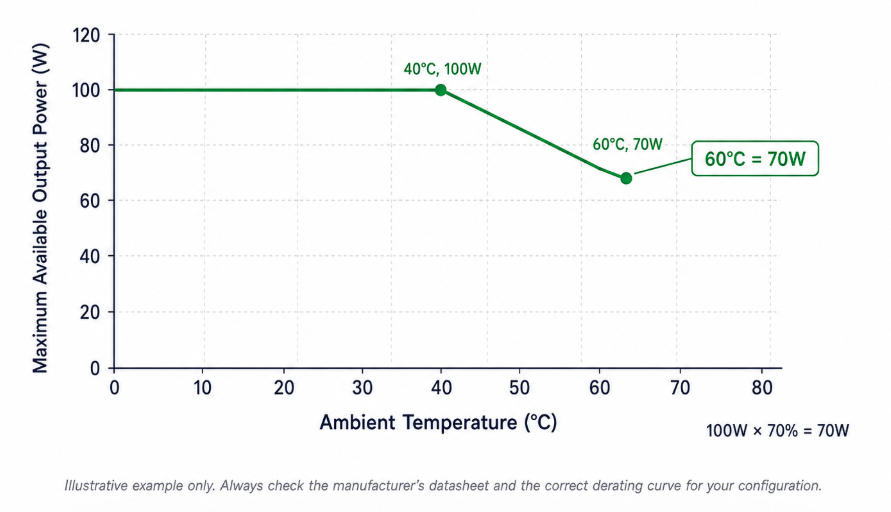
Locate your ambient temperature on the X-axis and move vertically to the applicable curve. Then read across to the Y-axis. The resulting figure represents the maximum output power or output current that the PSU should provide under those conditions.
For example, if a 100W PSU’s derating curve shows a maximum load of 70% at 60°C, its usable output power at that temperature is:
100W × 70% = 70W
That means a design requiring 80W should not use that particular PSU under those conditions.
4. Check which curve applies
Some power supplies have more than one derating curve, and it is important to use the curve that corresponds to the actual operating configuration. The applicable curve may depend on:
- Input and output voltage
- Cooling method
- Mounting orientation and method
- Ambient temperature
- Airflow
- Other defined operating conditions
Always make sure you are using the curve that matches the intended input voltage, output conditions, cooling arrangement, and installation. Derating data is based on defined test conditions, so a curve should not automatically be assumed to apply to a different configuration.
Temperature derating isn’t the only type of derating
Although thermal derating is common, power supply derating can also depend on input voltage. Many power supplies operate across a relatively wide input voltage range, but their maximum output power may not be identical across the whole range.
Low input voltages can put significant thermal stress on components because the PSU may need to draw more input current to deliver the same output power. As a result, a manufacturer may offer separate curves or maximum power ratings for different input voltage ranges.
For example, a PSU could have one maximum output power at 230VAC and a lower maximum power at a low line voltage. This means you should check both input voltage and ambient temperature rather than considering temperature alone.
What happens when multiple derating factors apply?
A power supply can be subject to more than one operating restriction at the same time. For example, the available output may be affected by ambient temperature while a separate limit also applies at a lower input voltage.
These restrictions should not be assumed to combine using a universal calculation. The correct method depends on the specific power supply and the guidance provided in its datasheet or application notes.
Depending on the PSU, the manufacturer may provide separate derating curves, a combined operating envelope, or specific instructions for applying one restriction alongside another. Always use the information that corresponds to the actual input voltage, ambient temperature, cooling method, and installation conditions.
If the datasheet does not explain how multiple restrictions interact, do not simply multiply the individual derating percentages. Check the manufacturer’s technical guidance or confirm the operating conditions with the supplier before finalising the PSU selection.
This is another reason why the nominal output rating alone is not enough when assessing whether a power supply is suitable for an application.
Natural convection or forced air cooling?
The way a power supply is cooled can have a significant effect on its derating requirements. Natural convection cooled power supplies rely on heat moving away from the PSU without an external fan. This is often desirable where low noise, simplicity, or reliability are priorities, but the available power may reduce more quickly as ambient temperature rises.
Forced-air cooling, meanwhile, uses a fan or other controlled airflow to improve heat transfer away from the power supply. Increasing airflow can improve heat transfer and, where specified by the manufacturer, allow a power supply to operate at a higher output power under particular temperature conditions.
Some manufacturers will offer separate derating curves for natural convection and different levels of forced-air cooling, showing, for example, how the allowable full-load temperature can change when a specified level of forced airflow is applied.
However, forced air shouldn’t be assumed to solve thermal problems. The airflow rate, direction, mounting arrangement, and cooling path must be appropriate for the particular PSU and system.
Why mounting and installation matter
A PSU’s thermal performance depends not only on its electrical specifications but also on how it is installed. Mounting orientation can affect natural convection and cooling efficiency. A power supply surrounded by other heat-producing components may also experience a higher local ambient temperature than expected.
When reviewing a derating curve, check the manufacturer’s requirements for:
- Mounting orientation
- Clearance around the PSU
- Natural convection or forced air cooling
- Minimum airflow
- Installation inside an enclosure
- Maximum ambient temperature
- Adjacent heat sources
A derating curve is only meaningful when the installation conditions match those under which the curve applies.
How power supply derating affects PSU selection
Consider derating during the design stage, not after a power supply has already been selected. Start by establishing the application’s actual requirements:
- Determine the required output voltage.
- Calculate the maximum output current.
- Calculate the required output power.
- Establish the full input voltage range.
- Determine the expected ambient temperature.
- Consider the PSU’s mounting arrangement and cooling method.
- Check the relevant derating curve.
- Compare the resulting available output power with the application’s maximum load.
- Allow appropriate design margin.
Suppose your equipment requires a maximum of 75W. You could select a 75W PSU because its nominal rating appears to match the requirement. But if the derating curve limits that PSU to 70% of its rated power at the application’s maximum ambient temperature, only 52.5W would be available.
A higher-rated PSU may therefore be necessary.
The important point is that the right PSU is not necessarily the one with the smallest nominal power rating that meets the load requirement. It is the one that can safely deliver the required power under the application’s real operating conditions.
Don’t overlook the maximum temperature
Every PSU has a maximum operating temperature, but that doesn’t necessarily mean it can deliver its full rated power up to that temperature. Available output power may gradually decrease as temperature rises, followed by a maximum temperature beyond which the unit shouldn’t be operated. The distinction between these two limits is important:
Maximum full-load temperature: the highest ambient temperature at which the PSU can deliver its specified output power.
Maximum operating temperature: the highest specified ambient temperature at which the PSU can operate, potentially at a reduced load.
Always check both values in the datasheet. For example, a 240W DIN rail AC/DC PSU supplied by Ideal Power specifies an operating temperature range up to +85°C, with full-load operation specified up to 60°C.
Similarly, individual products supplied by Ideal Power can have different thermal characteristics depending on their design. This is why the derating curve for the specific model matters more than a general rule of thumb.
How much power supply derating should you allow?
No universal percentage applies to every power supply. The required derating depends on the PSU, application, and operating conditions.
A common mistake is to apply a generic rule such as “always choose a PSU 20% above the load”. While additional capacity can provide useful design margin, it does not replace checking the manufacturer’s derating information. For a robust design, consider the worst-case operating conditions, including:
- Maximum ambient temperature
- Minimum input voltage
- Maximum continuous load
- Enclosure temperature
- Mounting orientation
- Available airflow
- Other heat-producing components
- Required service life
- Relevant environmental conditions
The resulting assessment should show that the PSU has sufficient available power under those conditions.
What to look for in a PSU datasheet
When comparing power supplies, don’t stop at the headline wattage. Look for these three primary specifications first:
Input: What AC or DC input voltage range does the PSU support?
Output: What output voltage, output current and maximum output power does it provide?
Derating: How do those limits change with temperature, input voltage and cooling conditions?
Then consider the wider application requirements, including efficiency, protection features, mounting, dimensions, approvals and environmental conditions.
The range supplied by Ideal Power includes AC/DC and DC/DC solutions across different form factors and power levels, with product specifications detailing operating temperature, input and output characteristics, protection and relevant approvals.
How Ideal Power Can Help With PSU Selection
Ideal Power is a power supply distributor and design-in partner, supplying a wide range of power conversion solutions including AC/DC power supplies, DC/DC converters, external power supplies and PCB mount solutions for electronic applications.
Selecting a suitable PSU involves more than matching the required output power. Ideal Power can support customers in reviewing the full operating requirements, including input voltage, output voltage and current, ambient temperature, cooling method, mounting arrangement, approvals, and the relevant manufacturer derating data.
Checking these factors helps ensure the selected PSU can operate reliably under the application’s expected conditions rather than simply meeting the required wattage under nominal conditions.
This can be particularly important for applications involving higher ambient temperatures, enclosed control cabinets, or other demanding operating environments. Considering derating and thermal performance during PSU selection can reduce the risk of insufficient available output or the need to revisit the power supply specification later in the design process.
Choose a PSU based on the application, not just the wattage
Power supply derating is an important part of selecting a PSU that will operate reliably throughout its intended service life.
The headline power rating tells you what the unit can deliver under its specified conditions. The derating curve shows how those capabilities change when conditions such as ambient temperature, input voltage, and cooling change.
For design engineers and manufacturers, reviewing these curves early can prevent an apparently suitable power supply from becoming a limitation later in development.
At Ideal Power, we can help you assess your application’s electrical and environmental requirements and identify a suitable power supply from the available options. Whether you need to meet tight space constraints, demanding operating conditions, specific safety standards or particular input and output requirements, getting the specification right at the design stage can make sourcing and integration much easier.
You can also configure your power supply requirements online to provide Ideal Power with the key details of your application.
Need help selecting the right power supply? Share your input, output, load and operating conditions with Ideal Power, and we’ll help you find a suitable solution.
